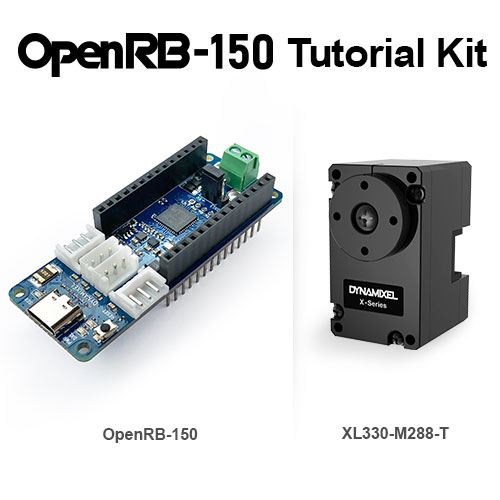
OpenRB-150 Tutorial Kit
| 注意事項 | 2026年4月より名称変更しました。(品番に変更はありません) 新)OpenRB-150 Tutorial Kit 旧)OpenRB-150 Starter Kit |
|---|
特徴
OpenRB-150 Tutorial Kitは、Arduino互換コントローラー「OpenRB-150」に、高性能な小型スマートサーボ「DYNAMIXEL XL330」と接続用ケーブルをセットにした、学習・開発に最適なキットです。従来のArduino MKRシリーズと同じピン配置を採用しており、使い慣れたArduino IDEで本格的なロボット制御をすぐに始められます。
-
小型・高性能なXL330シリーズを1基同梱
非常にコンパクトながら、位置・速度・電流(トルク)制御が可能なスマートサーボ「DYNAMIXEL XL330-M288-T」が1基セットになっています。複雑な配線なしにインテリジェントな動作を体験できます。
-
4基のDYNAMIXEL専用TTLポートを搭載
コントローラー本体にはTTL(3ピン)ポートを4基装備。同梱のXL330以外にも、追加でサーボを接続して多足ロボットやアームへの拡張が可能です。
※RS-485(4ピン)モデルの接続には、別売の「Communication Bridge」が必要です。 -
Arduino IDE & DYNAMIXEL Wizard 2.0対応
プログラム開発には「Arduino IDE」を、サーボの設定やテストには「DYNAMIXEL Wizard 2.0」を使用可能。初心者からプロフェッショナルまで幅広いユーザーに対応します。
対応製品と開発環境について
本キットに含まれるOpenRB-150は、以下のDYNAMIXELシリーズおよび開発ソフトウェアに対応しています。
| 項目 | 対応製品 / 動作条件 |
|---|---|
| 対応DYNAMIXEL |
同梱のXL330シリーズのほか、X / MX / AX / P各シリーズ(TTL 3ピン仕様)に対応。 ※RS-485(4ピン)通信モデルの接続には、別売の「Communication Bridge」が必要です。 ※24V駆動モデルを使用する場合は、別途外部電源が必要になります。 |
| サポートソフトウェア |
・Arduino IDE(プログラム開発用) ・DYNAMIXEL Wizard 2.0(設定・テスト用) |
■ 名称変更に関するお知らせ
本製品は製品名が「OpenRB-150 Starter Kit」から「OpenRB-150 Tutorial Kit」に変更されました(内容物・型番に変更はありません)。旧マニュアル等を参照される際はご注意ください。
内容物一覧
| お届け内容 | 数量 | 備考 / 仕様 |
|---|---|---|
| OpenRB-150 コントローラー本体 | 1個 | Arduino互換 / DYNAMIXEL用TTL4ポート搭載 |
| DYNAMIXEL XL330-M288-T | 1個 | 同梱のスマートサーボ(TTLモデル) |
| ロボットケーブル(X3P 180mm) | 1本 | OpenRB-150とサーボの接続用 |
| 電源接続用 ターミナルブロック | 1個 | 基板に実装済み |
▼ ご使用前に必ずご確認ください(別途必要なもの)
本キットには以下の製品は含まれておりません。別途ご用意ください。
・USB C-Type ケーブル(PC接続・プログラム書き込み用)
・電源ケーブル または バッテリー(サーボ駆動用)
※PCのUSB給電のみでサーボを動かすと、電流不足でPCが故障する恐れがあります。必ず外部電源(端子台への給電)をご使用ください。
ハードウェア仕様
| マイコン (Microcontroller) |
SAMD21 Cortex-M0+ 32bit ARM® MCU (48 MHz) |
| 基板電源入力 (Board Power Supply) |
USB 3.0 (5.0V) / 端子台・XT60 (3.7V ~ 12.6V) |
| 対応バッテリー (Supported Battery) |
Li-Po 1~3セル (3.7V~11.1V) ※別売のXT60端子が背面取付可能 |
| 回路動作電圧 (Circuit Operating Voltage) |
3.3 V ※I/Oピンの許容電圧も最大3.3Vです |
| DYNAMIXELポート電流 (DC Current for DXL) |
最大 3,000 mA |
| フラッシュメモリ / SRAM (Flash / SRAM) |
256 KB / 32 KB |
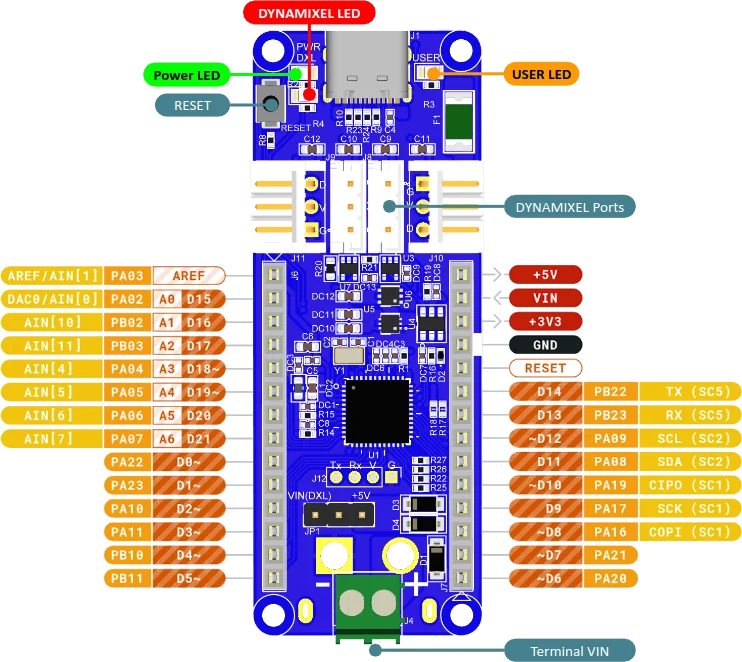
接続・配線のポイント
同梱のサーボ(XL330)を駆動させる際は、USB給電ではなく必ず「Terminal VIN(端子台)」から外部電源(Li-Poバッテリー等)を供給してください。USB給電のみで高負荷な動作を行うと、コントローラーや接続先PCの故障の原因となります。
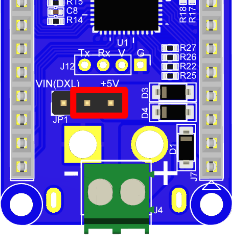
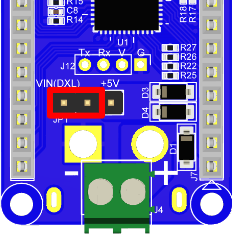
▼ 電源ソースジャンパーの設定
【重要】ジャンパーピンの設定を誤ると基板が故障します。供給方法に合わせて、以下のピンの向きを正しく差し替えてください。